While the Content tab gives you free rein, the Metadata tab is structured and allows you to fill in predetermined fields. Your data will always display consistently. The contents of the Metadata tab will vary depending on the type of asset.
Any Metadata that you need to fill in will be outlined in the relevant guide. If it is not mentioned you don't need to worry about adding it.
The only additional Metadata you might want to consider filling in for your pages is the "Section Description" and the "Meta Description" fields.
"Section Description" is the description that will be shown alongside the page title when a visitor performs a search on thewi.org.uk website.
"Meta Description" is the description that Google etc. will use, and that will appear when a visitor finds one of your pages on Google.
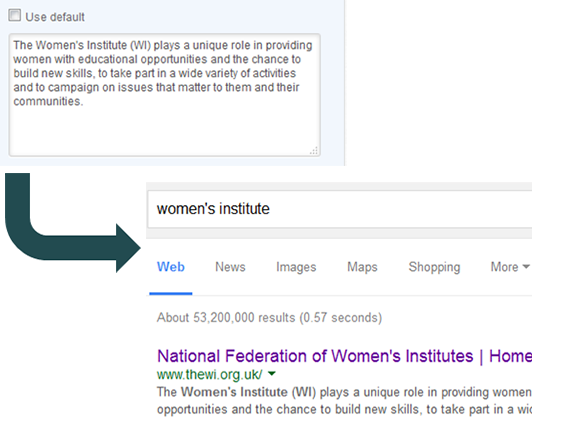
Hubspot have some handy tips for writing a good Metadata description:
1) Use action-oriented language. Action-oriented language is ideal for call-to-action copy -- which, if you think about it, is exactly what a meta description is -- because it tells the reader exactly what they can do if they click. Consider starting your meta descriptions with verbs like "Learn," or "Discover," and follow it up with specifics of what exactly they'll get if they click.
2) Keep it under 155 characters. Generally, a meta description should be under 155 characters. You can double-check the length of your meta description and title tags, and preview what it will look like with this handy tool.
3) Make your description specific and relevant. That's why it's so important to use descriptive words -- not unnecessary "fluff" words -- and do your best to connect with your target audience and let them know what they'll get from clicking through on your search result.